In DDOE’s Annotation Platform, a Recipe is a comprehensive configuration that defines how data is annotated for a specific task, with a focus on audio annotation workflows such as timeline-based interactions, waveform visualization, and structured audio outputs.
Audio recipes support transcription, classification, segmentation, speaker diarization, and multi-channel labeling for NLP and speech-related tasks.
Supported tasks include:
Speech transcription
Audio classification (e.g., noise, music, speaker type)
Time-based audio segmentation
Multi-channel audio workflows
Common use cases include speech recognition systems, call center analytics, and acoustic event detection.
Start Creating Recipes for Audio Tasks
Open Recipes from the left-hand navigation panel.
Click Create Recipe to bring up the configuration dialog.
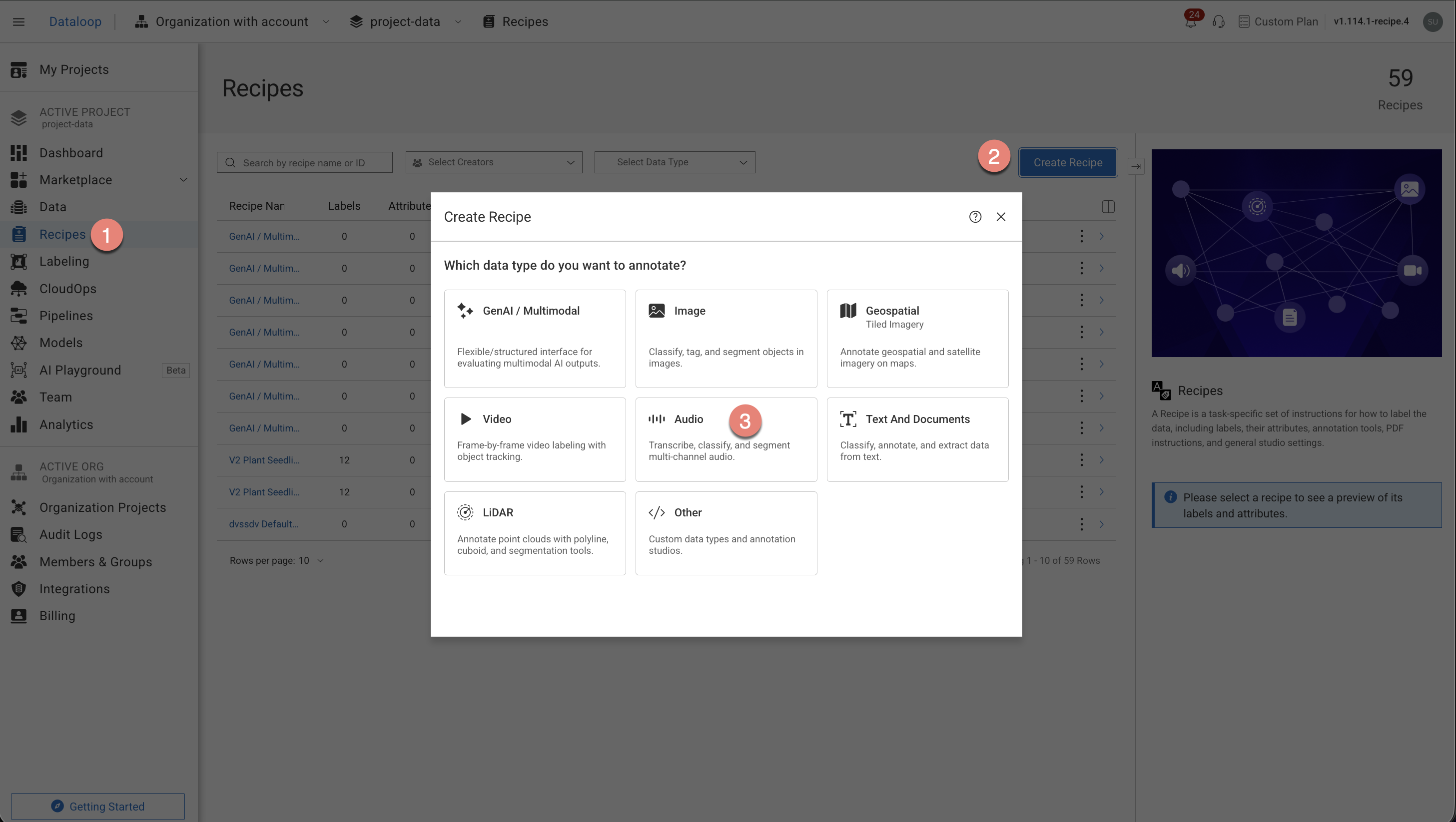
Choose the Audio option from the list.
Select the annotation types from the list. The annotation tools will be auto-configured according to your annotation type selection.
Transcription / Transition
Classification
Speaker Segmentation
Speech Recognition
Other Audio Tasks
Click Create Recipe. The recipe page is displayed and start configuring the following:
Labels
Attributes
Annotation tools
Instructions
Advanced Settings.