In DDOE’s Annotation Platform, a Recipe is a comprehensive configuration that defines how data is annotated for a specific task, with a focus on video annotation workflows, including temporal navigation, frame-based tools, and structured video outputs.
You can create video recipes using two types of annotation tasks:
Classic Video Tasks: Use Classic Video Tasks to perform frame-by-frame video annotation with built-in object tracking and interpolation tools that improve labeling speed and consistency across frames.
Multi-Video (Synced) Tasks: Use Multi-Video (Synced) Tasks to perform frame-by-frame annotation across multiple synchronized videos, allowing you to annotate related video streams together within a single task.
Advanced features such as object tracking help reduce repetitive work and improve annotation consistency over long sequences.
This recipe is ideal for applications like autonomous driving, surveillance, sports analysis, and activity recognition.
Start Creating Recipes for Classic Video Tasks
Open Recipes from the left-hand navigation panel.
Click Create Recipe to bring up the configuration dialog.
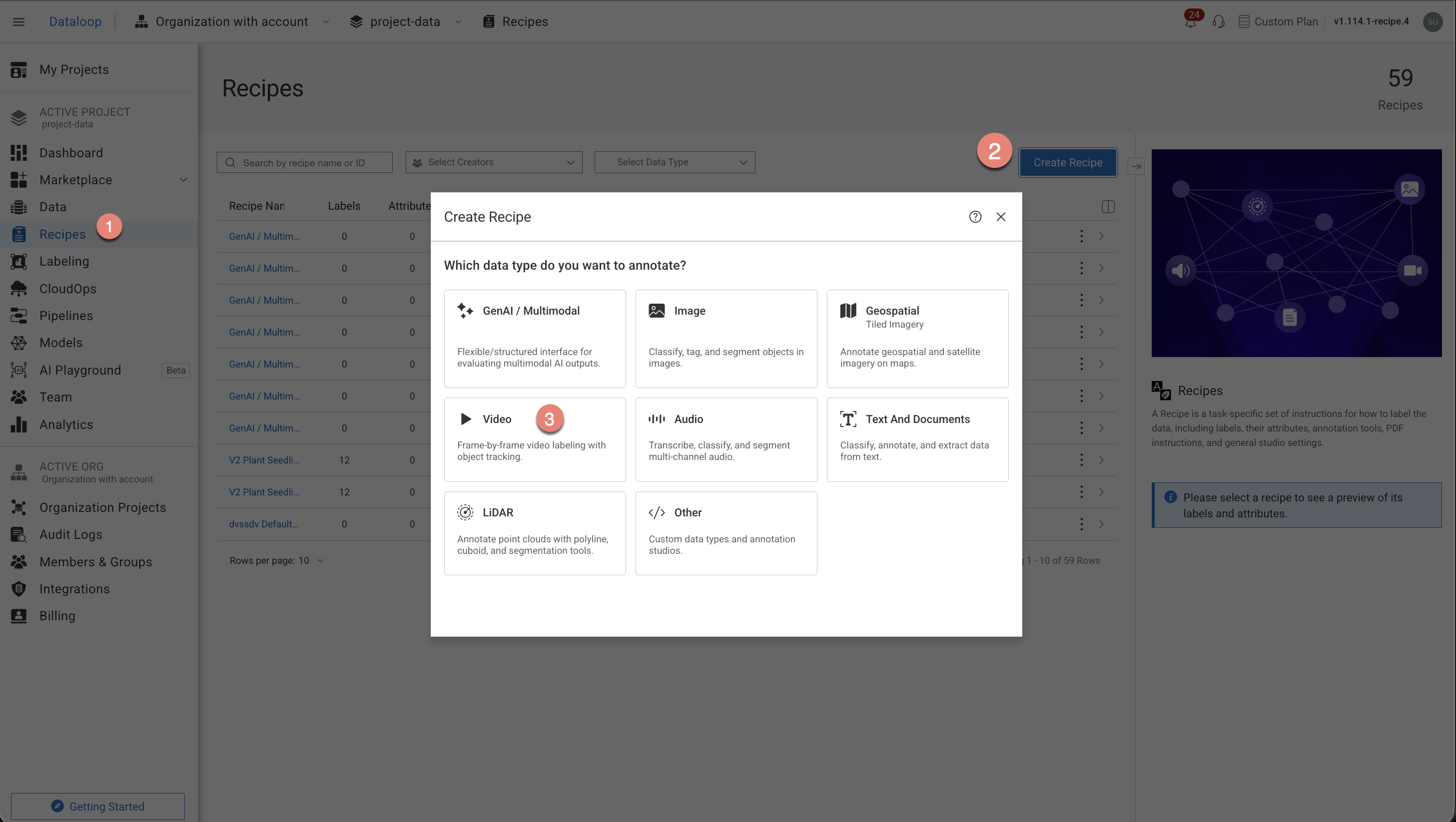
Choose the Classic Video Tasks option from the list.
Select the annotation types from the list. The annotation tools will be auto-configured according to your annotation type selection.
Object Detection
Object Tracking
Classification
Other
Click Create Recipe. The recipe page is displayed and start configuring the following:
Labels
Attributes
Annotation tools
Instructions
Advanced Settings.
Start Creating Recipes for Multi-Video (Synced) Tasks
Open Recipes from the left-hand navigation panel.
Click Create Recipe to bring up the configuration dialog.
Choose the Multi-Video (Synced) Tasks option from the list.
Select the annotation types from the list. The annotation tools will be auto-configured according to your annotation type selection.
Object Detection
Classification
Click Create Recipe. The recipe page is displayed and start configuring the following:
Labels
Attributes
Annotation tools
Instructions
Advanced Settings.