An annotator will have access to the Tasks page where can view the details of assignments and issues in seperate tabs; Assignments & Issues.
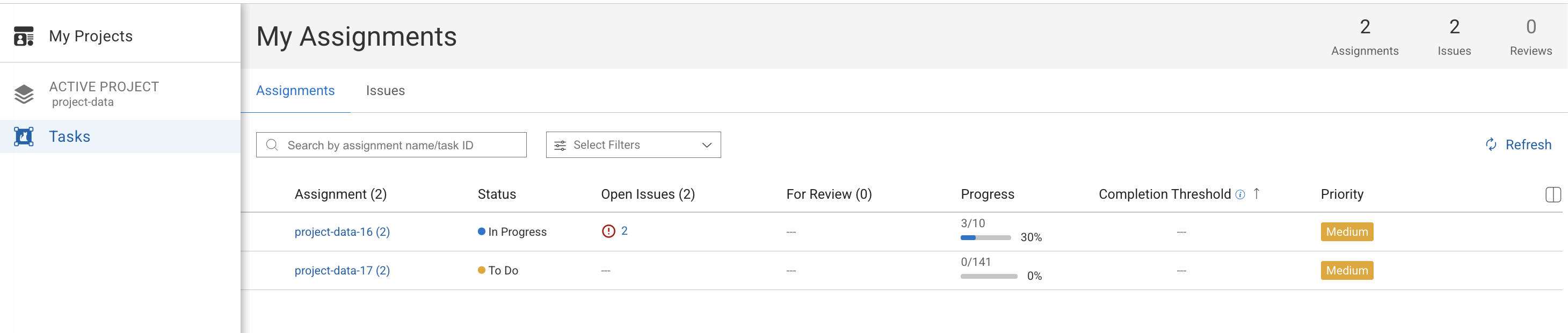
This tab displays all tasks currently assigned to the annotator. From here, the user can:
View assigned task names
See the Task Type (e.g., Labeling)
Check the Status (To Do, In Progress, etc.)
View the Completion Threshold (required number of items to complete)
See the Priority (High, Medium, Low)
Track Progress (completed items out of total)
Click Details to open and work on the assignment
Search and filter options are available at the top to quickly locate specific assignments.
This tab displays issues related to the annotator’s assignments.
Here, annotators can:
View reported issues
Track issue status
Review and resolve task-related problems
This helps ensure smooth progress and clear communication regarding task feedback or blockers.
Summary Counters (Top Right)
The summary counters provide a quick overview of the annotator’s workload:
Assignments: Number of active assignments
Issues: Total number of issues related to the annotator’s work
Reviews: Number of items pending review or QA.