The Dataloop Dataset Browser is a powerful interface that enables users to efficiently search, filter, and refine datasets to identify required items with ease. It provides multiple levels of search functionality, ranging from simple searches to advanced queries, ensuring flexibility for diverse user needs.
The Dataset Browser is a versatile tool that supports:
Filtering by item, annotation, and task properties.
Natural language semantic search via CLIP.
Multi-level search approaches (Basic, Advanced, and DQL).
Task-specific filtering for assignment management.
Filter Modes
The Dataset Browser supports three primary search modes: Basic Search, Advanced Search, and DQL Query Editor Search.
Also supports, Saved Filters search, Semantic Search, etc.
Basic Search
Advanced Search
DQL
Semantic Search
Basic Search
The Basic Search feature enables quick filtering and discovery of items using predefined parameters. It helps you easily locate items by applying simple conditions such as labels, attributes, status, users, and more.
Available pre-defined search filters are:
Annotated: allows to search annotated items or not annotated items.
Attributes: allows to search annotated items with attributes.
Labels: allows to search annotated items with specific labels.
Clicking on the  allows you to Add more search types into the query.
Search Criterias | Description |
|---|---|
Search by Labels | Find items by selecting a specific label from the list. |
Search by Attributes | Select an attribute from the list to locate items with specific attribute values linked to a label. |
Search by Item Status | Filter items based on their status (e.g., annotated, not annotated, described).
|
Search by Team | View items according to the users who worked on them. |
Search by Item Uploaded Date | Retrieve items uploaded on a specific date or within a date range. |
Search by File Name | Search items using their exact file name or partial matches. |
Search by File Extension | Filter items by file type (e.g., |
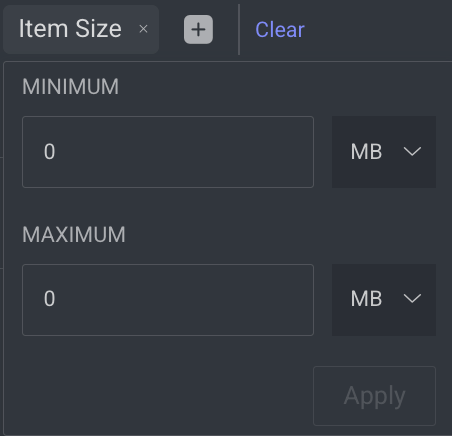
Search by Item Size | Locate items by defining size conditions (e.g., minimum or maximum in KB, MB, or GB).
|
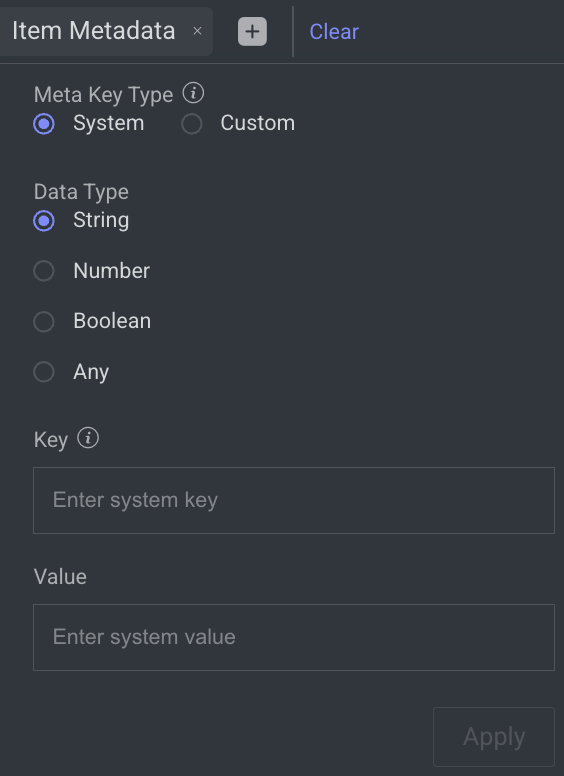
Search by Item Metadata | Search using custom metadata values associated with items, such as Meta Key Type -
|
Search by Item Media Type | Filter items based on their media type, such as |
Search by Annotation Type | Retrieve items based on annotation types (box, point, polygon, etc.). |
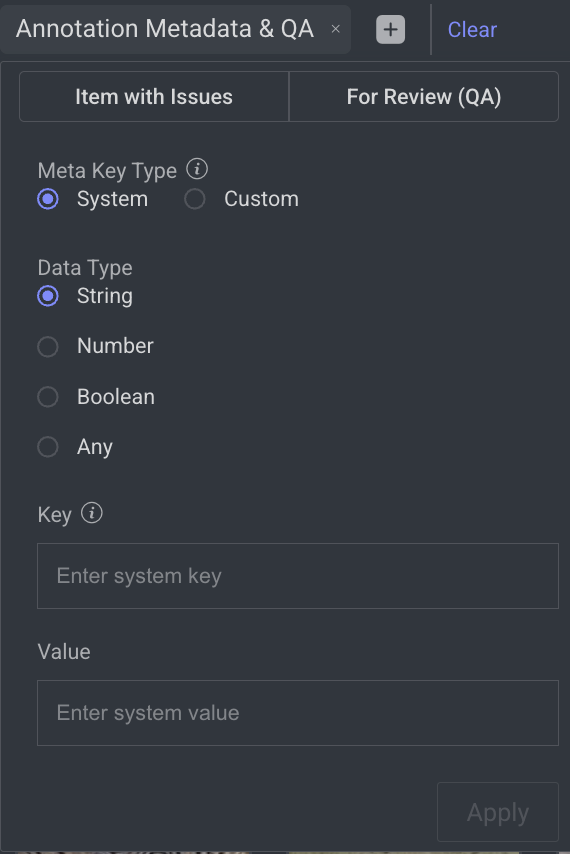
Search by Annotation Metadata & QA | Search using custom metadata values associated with items, such as Meta Key Type - |
.png)
Users can clear a single filter by pressing X or the Clear button inside the filter config dialog, or all filters by pressing Clear.
Advanced Search
Filters are integral components of the Dataset Browser, providing users with the capability to refine and narrow down the displayed items based on specific criteria. These filters offer a powerful tool for managing and exploring large datasets efficiently.

Advanced Search uses a search schema that allows users to query items and annotations data with higher granularity:
Search Items using structured schema fields.
Explore diverse use cases of search schemas within the Dataset Browser.
View available schemas directly in the interface for guidance.
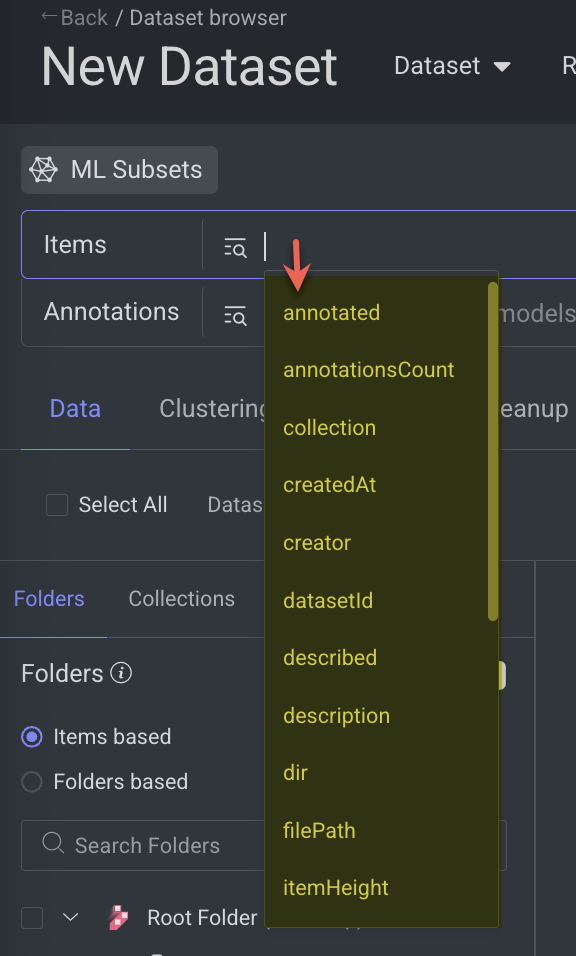
Search Items by Item Data
In the Data Browser, click on the Items field.
Select or enter the required search query.
Click Search to view the search result.
Search by Annotation Status
By Annotation Status -> Annotated or Not.
In the Data Browser, click on the Items field.
Select or enter the query as follows:
annotated = true or
annotated = false Click Search to view the search result.
Search by Annotation's Count
In the Data Browser, click on the Items field.
Select or enter the query as follows:
annotationsCount = 5Click Search to view the search result.
Search by Collection List
In the Data Browser, click on the Items field.
Select or enter the query as follows:
collection = 'Collection A'Click Search to view the search result.
Search by Creation Date
In the Data Browser, click on the Items field.
Select or enter the query as follows:
createdAt = (03/12/2023)Click Search to view the search result.
Search by Creator Email
In the Data Browser, click on the Items field.
Select or enter the query as follows:
creator = 'your@email-ID'Click Search to view the search result.
Search by File Name
In the Data Browser, click on the Items field.
Select or enter the query as follows:
name = '63dbdd10be95cbe35df0a78b.jpg' Click Search to view the search result.
Search by Dataset ID
In the Data Browser, click on the Items field.
Select or enter the query as follows:
datasetId = '65950d1d5c356a5e51f6727e'Click Search to view the search result.
Search by Description Status
Description Status is Available or Not
In the Data Browser, click on the Items field.
Select or enter the query as follows:
described = trueor
described = false Click Search to view the search result.
Search by Description Text
In the Data Browser, click on the Item field.
Select or enter the query as follows:
description = 'description-text'Whole description
Ensure to enter the full description to receive the result.
Click Search to view the search result.
Search by Folder Directory
In the Data Browser, click on the Items field.
Select or enter the query as follows:
dir = '/sub-folder name' or
dir IN '/sub-folder name/sub-folder name' Click Search to view the search result.
Search by File Path
In the Data Browser, click on the Items field.
Select or enter the query as follows:
filePath = '/folder name/sub-folder name/fileName.jpg' Click Search to view the search result.
Search by Height
In the Data Browser, click on the Items field.
Select or enter the query as follows:
itemHeight = 234Use the height value (for example, "height": 234) from the item metadata.
Click Search to view the search result.
Search by Width
In the Data Browser, click on the Items field.
Select or enter the query as follows:
ItemWidth = 234Use the width value (for example, "width": 234) from the item metadata.
Click Search to view the search result.
Search by Item ID
In the Data Browser, click on the Items field.
Select or enter the query as follows:
ItemID = '65798f8f81b02fbafe34fcad'Click Search to view the search result.
Search by Discarded Items
In the Data Browser, click on the Items field.
Select or enter the query as follows:
ItemStatus = 'Discard' Click Search to view the search result.
Search by Completed Items
In the Data Browser, click on the Items field.
Select or enter the query as follows:
ItemStatus = 'Complete' Click Search to view the search result.
Search by Approved Items
In the Data Browser, click on the Items field.
Select or enter the query as follows:
ItemStatus = 'Approve' Click Search to view the search result.
Search by JSON (Media Type)
In the Data Browser, click on the Items field.
Select or enter the query as follows:
MediaType = 'application/json' Click Search to view the search result. It displays the all the JSON files.
Search by PCD (Media Type) Files
In the Data Browser, click on the Items field.
Select or enter the query as follows:
MediaType = 'application/pcd' Click Search to view the search result. It displays the all the PCD files.
Search by Audio Files
In the Data Browser, click on the Items field.
Select or enter the query as follows:
MediaType = 'audio/*'Click Search to view the search result. It displays the all the audio files.
Search by Image Files
In the Data Browser, click on the Items field.
Select or enter the query as follows:
MediaType = 'image/*'Click Search to view the search result. It displays the all the image files.
Search by Text Files
In the Data Browser, click on the Items field.
Select or enter the query as follows:
MediaType = 'text/*'Click Search to view the search result. It displays the all the text files.
Search by Video Files
In the Data Browser, click on the Items field.
Select or enter the query as follows:
MediaType = 'video/*'Click Search to view the search result. It displays the all the video files.
Search by Frames Per Second
Search Video Files by Frames Per Second (Metadata - fps) in the Dataset.
In the Data Browser, click on the Items field.
Select or enter the query as follows:
metadata.system.fps = 25Use the fps value (for example, "fps": 25) from the item metadata.
Click Search to view the search result.
Search by System Metadata's Mimetype
Search Items by System Metadata's Mimetype in the Dataset.
In the Data Browser, click on the Items field.
Select or enter the query as follows:
metadata.system.mimetype = 'image/jpeg'Use the mimetype value (for example, "mimetype": "image/jpeg", "mimetype": "text/html", or "mimetype": "audio/mp3" ) from the item metadata.
Click Search to view the search result.
Search by File Size Using Metadata
Search Items by File Size from the Item Metadata.
In the Data Browser, click on the Items field.
Select or enter the query as follows:
metadata.system.size = 'value' Click Search to view the search result.
Search by Frames Per Second Using Metadata
In the Data Browser, click on the Items field.
Select or enter the query as follows:
metadata.system.fps = 15Use the fps value (for example, "fps": 15) from the item metadata system.
Click Search to view the search result.
Search by Duration Using Metadata
In the Data Browser, click on the Items field.
Select or enter the query as follows:
metadata.system.duration = 30.8Use the duration value (for example, "duration": 30.8) from the item metadata system.
Click Search to view the search result.
Search by Width Using Metadata
In the Data Browser, click on the Items field.
Select or enter the query as follows:
metadata.system.width = 320Use the Width value (for example, "width": 320) from the item metadata system.
Click Search to view the search result.
Search by Height Using Metadata
In the Data Browser, click on the Items field.
Select or enter the query as follows:
metadata.system.height = 240Use the Height value (for example, "height": 240) from the item metadata system.
Click Search to view the search result.
Search by Dataset Tags Using Metadata
Search Items by the Dataset Tags (Train, Validation, or Test) from the Item Metadata.
In the Data Browser, click on the Items field.
Select or enter the query as follows:
metadata.system.tags.train = true Use the Tags value from the item metadata system.
for example,
    "tags":
        "train": true
Or
   "tags":
       "validation": true
Or
    "tags":
        "test": true
Use the Tags value from the item metadata system.
Click Search to view the search result.
Search by Reference ID Using Metadata
Search Items by the Reference ID from the Item Metadata.
In the Data Browser, click on the Items field.
Select or enter the query as follows:
metadata.system.refs.id = 649c421b9084a344b862289bUse the refs ID value (for example, "id": "649c421b9084a344b862289b") from the item metadata system.
Click Search to view the search result.
Search by Reference Type Using Metadata
Search Items by the Reference Type from the Item Metadata.
In the Data Browser, click on the Items field.
Select or enter the query as follows:
metadata.system.refs.type = 'assignment' Use the Type value (for example, "type": "assignment") from the item metadata system.
Click Search to view the search result.
Search by Encoding Using Metadata
Search Items by the Encoding from the Item Metadata.
In the Data Browser, click on the Items field.
Select or enter the query as follows:
metadata.system.encoding = 7bitUse the Encoding value (for example, "encoding": "7bit") from the item metadata system.
Click Search to view the search result.
Search by Original Name Using Metadata
Search Items by the Original Name from the Item Metadata.
In the Data Browser, click on the Items field.
Select or enter the query as follows:
metadata.system.originalname = video-tutorial-v1.mp4Use the originalname value (for example, `"originalname": "video-tutorial-v1.mp4") from the item metadata system.
Click Search to view the search result.
Search by Model Test Set Items
Search Items are Designated for a Model Test Set.
In the Data Browser, click on the Items field.
Select or enter the query as follows:
ModelTestSet = trueor,
ModelTestSet = false Click Search to view the search result.
Search by Model Train Set Items
Search Items are Designated for a Model Train Set.
In the Data Browser, click on the Items field.
Select or enter the query as follows:
ModelTrainSet = true or,
ModelTrainSet = false Click Search to view the search result.
Search by Model Validation Set Items
Search Items are Designated for a Model Validation Set.
In the Data Browser, click on the Items field.
Select or enter the query as follows:
ModelValidationSet = true or,
ModelValidationSet = true Click Search to view the search result.
Search by Updated Date
In the Data Browser, click on the Items field.
Select or enter the query as follows:
updatedAt = (10/04/2024)Click Search to view the search result.
Search by User Who Updated
In the Data Browser, click on the Items field.
Select or enter the query as follows:
updatedBy = 'name@dataloop.ai'Click Search to view the search result.
Search Items by Annotation Data
In the Data Browser, click on the Annotation field.
Select or enter the required search query.
Click Search to view the search result.
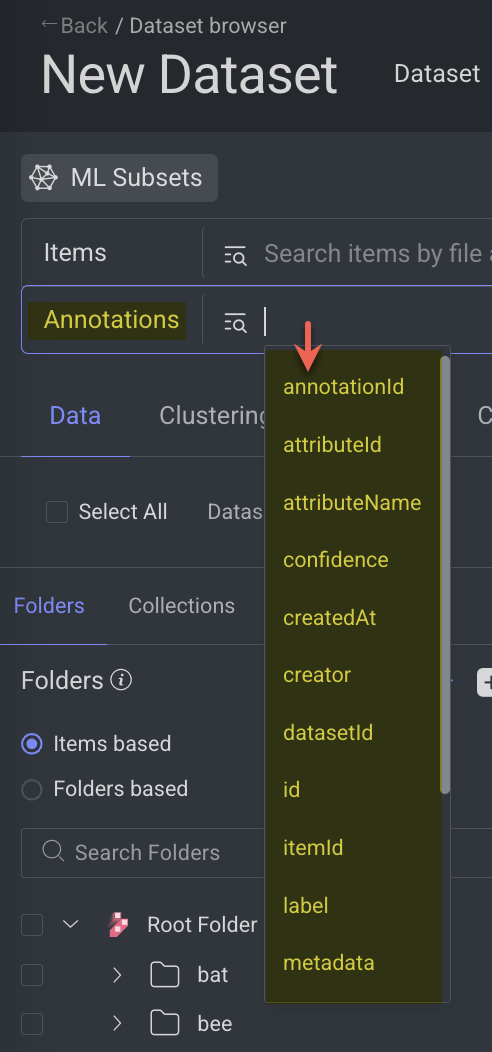
Annotation ID
Search Annotations by Annotation ID.
In the Data Browser, click on the Annotations field.
Select or enter the query as follows:
annotationId = '6638e5f4fb9b79bc00d04288'Copy the annotationId value from opening a labeled item -> select an annotation from the right-side panel -> click on the 'i' (info) icon -> copy annotation ID.
Click Search to view the search result.
Confidence Value
Search Annotations by Label's Confidence Value.
In the Data Browser, click on the Annotations field.
Select or enter the query as follows:
Confidence = '402.33'Click Search to view the search result.
Creation Date
In the Data Browser, click on the Annotations field.
Select or enter the query as follows:
createdAt = (03/12/2023)Click Search to view the search result.
Annotation Creator
Search Annotations by Annotation Creator.
In the Data Browser, click on the Annotations field.
Select or enter the query as follows:
creator = 'creator's email ID' Click Search to view the search result.
Dataset ID
Search Annotations by Dataset ID.
In the Data Browser, click on the Annotations field.
Select or enter the query as follows:
datasetId = '65950d1d5c356a5e51f6727e'Click Search to view the search result.
Attribute’s Name
Search Annotations by Attribute’s Name.
In the Data Browser, click on the Annotations field.
Select or enter the query as follows:
attributeName.<name of the attribute> = '<attribute value>'For example,
Attribute Name = How is it. By default, it displays all available attributes.
Attribute Value = Good or Bad. By default, it displays all available attribute values.
then, the query will be attributeName.How_is_it = 'Good'
Click Search to view the search result.
Attribute ID
In the Data Browser, click on the Annotations field.
Select or enter the query as follows:
attributeName.<ID of the attribute> = '<attribute value>'For example,
Attribute ID = 1. By default, it displays all available attribute ID.
Attribute Value = Good or Bad. By default, it displays all available attribute values.
then, the query will be attributeId.1 = 'Good'
You can copy the attributeId value from the Recipe -> Labels & Attributes -> Right-side section (Create Section)
Click Search to view the search result.
Item ID
Search Annotations by the Item ID.
In the Data Browser, click on the Annotations field.
Select or enter the query as follows:
itemId = '65798f8f81b02fbafe34fcad'Click Search to view the search result.
Label Name
Search Annotations by the Label Name. Displays all available labels.
Displays all available labels
When a dataset is linked to one recipe, and a task is created using items from that dataset with a different recipe, the label filters in the Dataset Browser will display labels from both the dataset’s recipe and the task’s recipe.
In the Data Browser, click on the Annotations field.
Select or enter the query example as follows:
label = 'Cat'Click Search to view the search result.
Model Name
In the Data Browser, click on the Annotations field.
Select or enter the query as follows:
modelName = 'yolov3'You can copy the model name value from the JSON file of the item.
Click Search to view the search result.
Parent Annotation (Parent ID)
In the Data Browser, click on the Annotations field.
Select or enter the query as follows:
parentId = '1234'Click Search to view the search result.
Source of the Annotation
Search Annotations by the Source of the Annotation.
In the Data Browser, click on the Annotations field to find where the annotation is created.
Select or enter the query as follows:
type = 'ui' or
type = 'sdk' Click Search to view the search result.
Label's Attribute
In the Data Browser, click on the Annotations field.
Select or enter the query as follows:
metadata.system.attributes.1 = 'Yes' Attributes
The attributes are defined according to the customizations made in the recipe.
Click Search to view the search result.
Annotation Type
In the Data Browser, click on the Annotations field.
Select or enter the query as follows:
type = 'cube'Click Search to view the search result.
Update Date
In the Data Browser, click on the Annotations field.
Select or enter the query as follows:
updatedAt = (03/12/2023)Click Search to view the search result.
Search Items by Task Data
In the Data Browser, add the Tasks filter.
In the Tasks' field, select task's
IDorNamecriteria from the list.Enter the value and click Search to view the search result.
Auto-complete for task name search
Receive real-time auto-complete suggestions as you type a task name.
Suggestions are dynamically refreshed and sourced from the first 100 matching tasks. To improve system performance, the number of tasks displayed in the dataset browser is limited:
Lazy loading: Tasks are loaded in batches of 100 as you scroll through the task filter component.
Maximum limit: Up to 1,000 tasks are loaded, prioritized by last updated time.
Task's ID
In the Data Browser, add the Tasks filter.
In the Tasks' field, select the TaskID from the list.
Enter the value as follows.
TaskID= 'task's ID'Click Search to view the search result.
Task's Name
In the Data Browser, add the Tasks filter.
In the Tasks' field, select the TaskName from the list.
Select or enter query as follows:
TaskName = 'task's Name'Click Search to view the search result.
Search Query Variables
Search Items
To learn various search options using the schema search, see the Search Items article.
Filter Data Type | Filter Variable | Description | Conditions | Data Types |
|---|---|---|---|---|
Items |
| Filter items based on whether they are annotated or not. |
| Boolean values ( |
Items |
| Filter items based on the number of annotations. |
| String |
Items |
| Filter items based on the collection folder name |
| String |
Items |
| Filter items based on the date and time of their creation. |
| dd/mm/yyyy |
Items |
| Filter items based on the creator of the item. |
| String |
Items |
| Filter items based on the dataset ID. |
| String |
Items |
| Filter items based on the presence or absence of a description. |
| Boolean values ( |
Items |
| Filter items by searching for those that contain a specific part of the description text. |
| String |
Items |
| Filter items based on their folder location within the dataset. |
| String |
Items |
| Filter items by the file location. |
| String |
Items |
| Filter items based on the height value of each item. |
| String |
Items |
| The unique ID of the item. |
| String |
Items |
| Filter items based on the item's annotation status |
| String (Discard, Complete, and Approve) |
Items |
| Filter items according to the width value of each item. |
| String |
Items |
| The filter allows searching based on their media types, such as video or image. |
| String |
Items |
| Filter items based on metadata information (for example, |
| String |
Items |
| Filter items that are designated for testing the model. |
| Boolean values ( |
Items |
| Filter items that are designated for training the model. |
| Boolean values ( |
Items |
| Filter items that are designated for validating the model. |
| Boolean values ( |
Items |
| Filter items based on their name. |
| String |
Items |
| Filter items based on the item's last updated date. |
| String |
Items |
| Filter items based on the email ID of the user who last updated the item. |
| String |
Annotations |
| Filter annotation based on the annotation ID. |
| String |
Annotations |
| Filter annotation based on the attribute ID. |
| String |
Annotations |
| Filter annotation based on the attribute name. |
| String |
Annotations |
| Filter annotations based on its confidence level. The Confidence is the measure of certainty or accuracy in the labels assigned to data, typically expressed as a percentage. Higher confidence scores indicate greater reliability of the annotations. |
| String |
Annotations |
| Filter annotations based on the date and time of their creation. |
| dd/mm/yyyy |
Annotations |
| Filter annotations by the user's email ID who created the annotation. |
| String |
Annotations |
| Filter annotations based on the dataset ID. |
| String |
Annotations |
| Filter annotations based on the annotation ID. |
| String |
Annotations |
| Filter annotations based on the item ID. |
| String |
Annotations |
| Filter annotations based on the labels. |
| String |
Annotations |
| Filter items based on annotation metadata information, such as |
| String |
Annotations |
| Filter annotations based on the model names. |
| String |
Annotations |
| Filter the data using the ID of the parent annotation. |
| String |
Annotations |
| Filter the data using the by where the annotation was created: UI/SDK. |
| String |
Annotations |
| Filter the data using the types of annotations. |
| String |
Annotations |
| Filter annotations based on the last updated date. |
| String |
Annotations |
| Filter annotations based on the email ID of the user who last updated the item. |
| String |
Tasks |
| Filter the data using the Tasks' ID |
| String |
Tasks |
| Filter the data using the Tasks' Name |
| String |
DQL Search
The Dataloop Query Language (DQL) provides a powerful and flexible way to search, filter, and retrieve items within a dataset. Unlike Basic Search, which uses predefined filters, DQL enables users to build custom, fine-grained queries that can combine multiple conditions and operators.

DQL Syntax Highlights
DQL queries are written in a structured JSON-like format. Some of the common elements include:
Field Operators:
=,!=(equals / not equals)>,<,>=,<=(range comparisons)in,not in(match against lists)
Logical Operators:
$and,$or,$not(combine multiple conditions)
Wildcard & Regex Support:
Search partial text patterns or match flexible strings.
Use the DQL Query Editor to Search
In addition to data search using the basic UI, it is possible to filter data using the Dataloop Query Language.
In the Dataset Browser, click on the DQL tab.
Click on the DQL Editor icon. The DQL Search window is displayed.
Edit the query as required, or select a saved query from the list.
Once edited, click Search to run the search query, or click Save As to save it.
Delete DQL Search Query
Click on the Delete Query to delete the query.
Copy the DQL Filter Query
In the Dataset Browser, click on the DQL tab.
Click on the Copy Filter icon. A confirmation message is displayed, and the query will be copied in DQL format.

Expand the DQL Filter Query
In the Dataset Browser, click on the DQL tab.
Click on the Expand icon. The query field will be expanded.

Filters Operands
The following operators are applied within and between filters, unless otherwise specified when manually modifying a DQL query.
Cross Filter Operand
A relationship between multiple filters in a single query is based on the AND operand.
For example, filtering by status Annotated AND the user john@doe.ai AND the annotation type: Box, will return items that are annotated, have Box annotation, and have john@doe.ai as an annotator in one or more of the annotations.
Inter-Filter Operand
The operand relationship between multiple values in a specific filter is based on the OR operator.
For example, filtering by labels with the values Person and Dog, the filter will return all items with annotations of either of these labels, not necessarily both at the same time.
Semantic Search - CLIP Based
NLP (Natural Language Processing) with CLIP (Contrastive Language-Image Pre-Training) refers to the integration of language understanding capabilities with visual recognition. CLIP is a neural network model that leverages NLP techniques to process and understand text while simultaneously analyzing and comprehending images. This enables the model to interpret and align textual descriptions with corresponding visual content effectively.
You can input any descriptive text, and the model will retrieve images or data entries that best match the query, significantly enhancing the user experience by making the search process more intuitive and flexible. Additionally, you can use it alongside other search fields such as Annotations and Items to further refine and improve your search results.
Prerequisites: Install a CLIP Model.
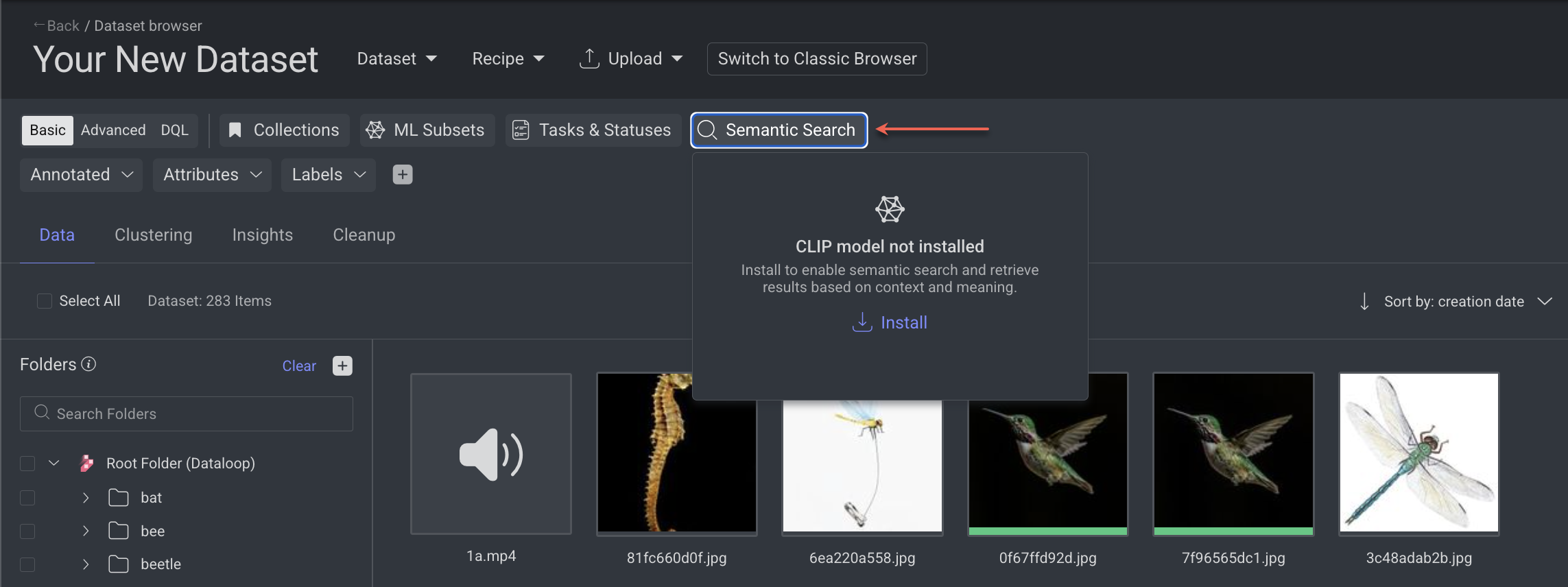
In the Data Browser, click on the Semantic Search.
Select the NLP (CLIP) from the list. A new field NLP (CLIP) is added.
Enter the required text in the NLP (CLIP) field. For example, "Image with red cars".
Click Search to view the search result.
Searchable and Unsearchable Metadata
Searchable metadata refers to key-value pairs stored under
metadata.userthat are indexed by Dataloop. Learn more.Unsearchable metadata in Dataloop refers to custom key-value pairs stored under alternative subpaths like
metadata.user.unsearchable, which are not indexed by the platform. Learn more.
Filter by Collections
The Collections feature in Dataloop's Data Browser helps organize data by allowing you to group specific sets of items based on task needs (e.g., annotation, review, training) into a collection folder. You can create up to 10 collection folders.
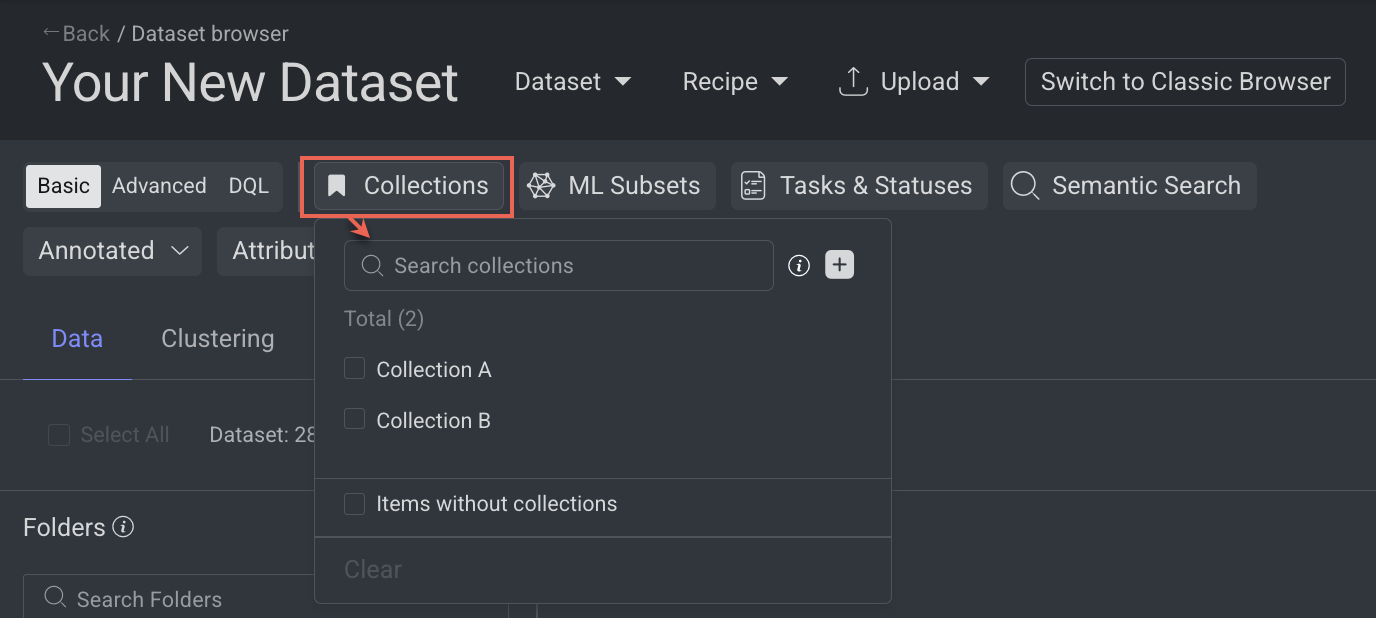
Open the Dataset Browser: Go to the Data → Datasets → Your Dataset → Data Browser.
Select the Collections from the top-bar. The available items are displayed in folder wise.
Select a collection from the list. Once selected, only items included in that collection will be displayed.
Filter Items without Collections
Click on the Items without collections
Learn more about Collections.
Filter by ML Subsets
The ML Subsets view in Dataloop’s Data Browser is a dedicated feature that streamlines machine learning workflows by helping you organize and manage datasets more efficiently. It enables you to classify and filter items according to their ML subset assignments—such as train, validation, and test—which are essential stages in the ML lifecycle for model development and evaluation.
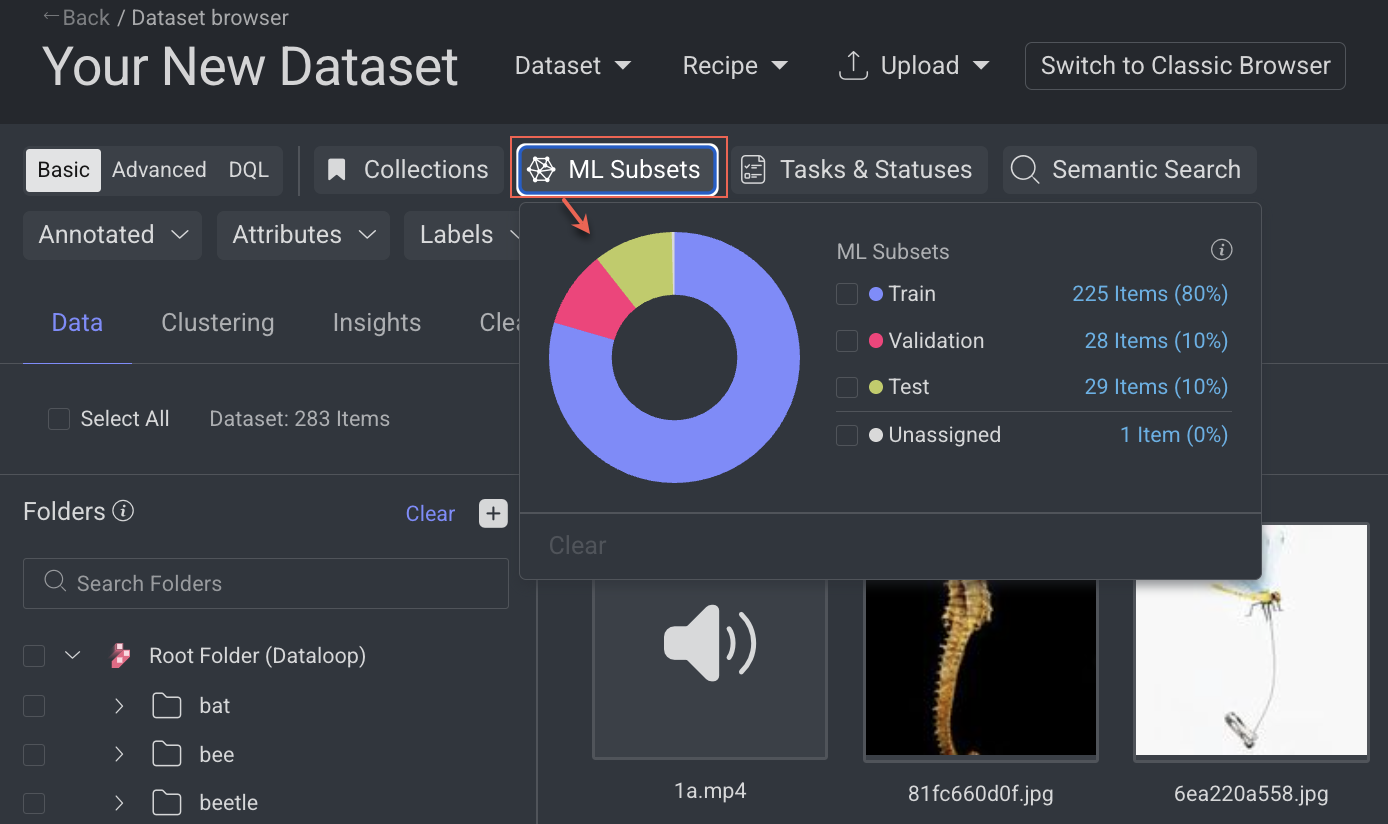
Open the Dataset Browser: Go to the Data → Datasets → Your Dataset → Data Browser.
Select the ML Subsets from the top-bar. The available items are displayed in folder wise.
Select a subset. For example, Train, etc. and click outside of the ML Subsets pop-up. The items are added to the train subset will be filtered and displayed.
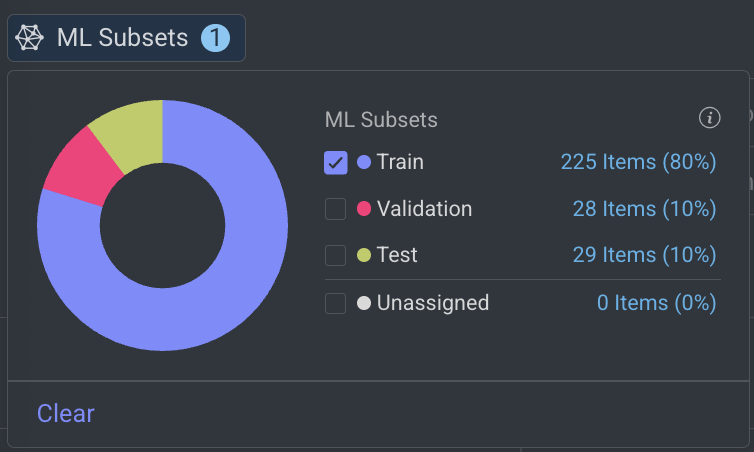
A search query for the train subsets will be also added and visible on the Items search field.

If there are no items added to ML Subsets, click Split Into Subsets.
Learn more about ML Subsets.
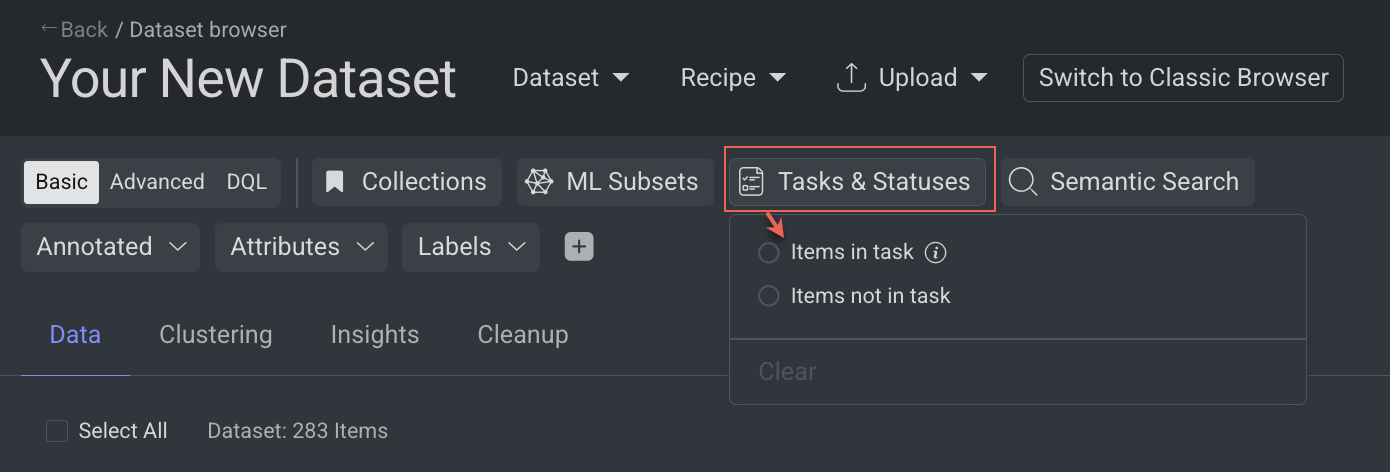
Filter by Tasks & Statuses
The Tasks & Statuses filter in Dataloop's Data Browser allows you to filter and search for items based on task-related attributes, such as task status or lack of assignments. This feature offers advanced filtering options, enabling better data management.
Prerequisites: Create a Task.
Filters Items by Tasks & Statuses
Open the Dataset Browser: Go to the Data → Datasets → Your Dataset → Data Browser.
Select the Tasks & Statuses from the top.
Select the following options to filter items:
Items in task:
Search tasks: Select a task to filter items included as part of this task.
Filtering by Status:
Use the Timestamp to select a time period to view the items. Use the filter to view items based on the following task status options.
Items with Status [= (equals)]: Filter items that have one of the following assigned task status: Complete or Discard
Items with Status [!= ( not equals)]: Filter items that do not have one of the following assigned task status: Complete or Discard.
Items without Status: Filter items that do not have a status. The DQL (Data Query Language) query will update accordingly.
Items Not in task: Filter items that are not part of any tasks.
Item Status
An item earns the status annotated if it receives any form of annotation, such as a classification, a note, or any other tool-generated annotation, regardless of whether this occurs in the dataset browser or during a task. However, being annotated doesn't necessarily mean an item is completed.
This situation may arise if the item is annotated via the dataset browser, where annotations can be saved without assigning a status, or if it's annotated during a task without the complete button being engaged. Perhaps because the annotator plans to return to it later.
Completed status is assigned to an item when an annotator finalizes their work on it by clicking the complete button during a task.
An approved status is granted after an item undergoes a QA task and the QA tester decides to approve it by clicking the respective button.
An item is deemed not annotated if it lacks any annotations. Interestingly, an item can be marked as completed and yet be considered not annotated if the complete button was clicked without any actual annotation work being done on it.
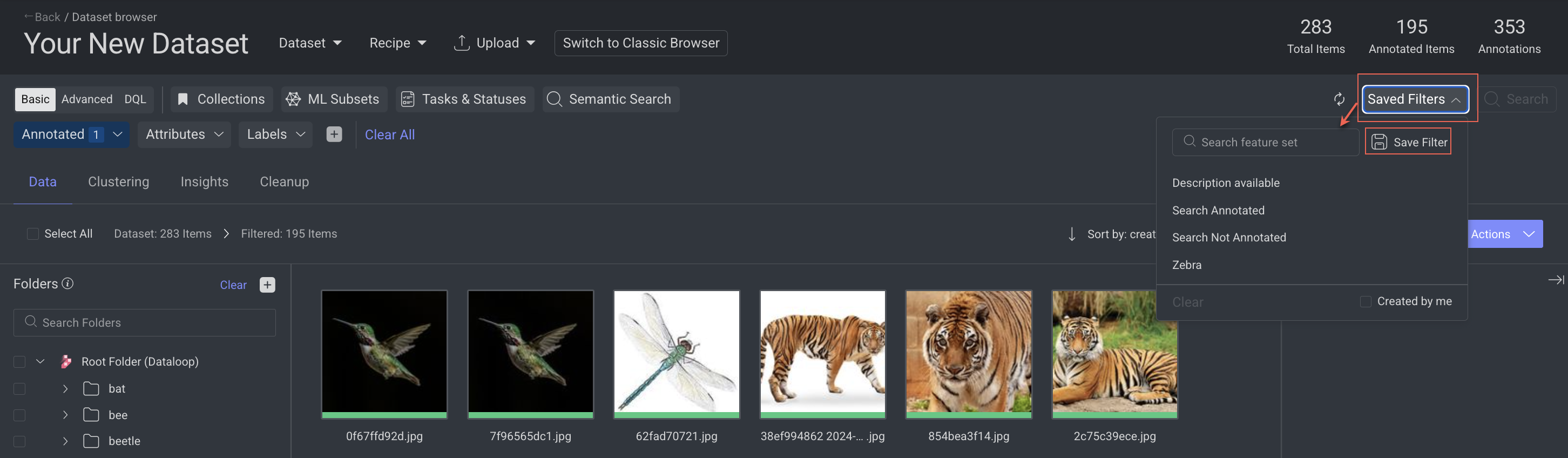
Saved Filters
The Dataloop platform allows you to customize and save search queries within data querying or search systems, designed to streamline and optimize user interactions with large datasets.
Save Search Queries
Dataloop platform offers the ability to save specific search filter criteria, allowing for efficient and consistent future searches.
Open the Dataset Browser: Go to the Data → Datasets → Your Dataset → Data Browser.,
Create a search query.
Click on Saved Filters.
Select Save Filter. A dialogue window is displayed.
Enter a name for the new filter query.
Click Save. A confirmation message is displayed.
Filter Items Using Saved Queries
Dataloop platform offers the ability to reuse specific search filter criteria.
In the Dataset Browser, click on the Saved Filters.
Select Saved Filters and choose the saved filter from the list. Clicking on the saved filter allows the search query to run and displays the result.
View Saved Filters
Up to three saved filters are displayed in the top menu, above of the search bar. Clicking on any of these filters will automatically run the corresponding query in the Smart Search field, instantly applying the saved conditions to your dataset.
Delete Saved Search Queries
Dataloop platform offers the ability to reuse specific search filter criteria.
In the Dataset Browser, click on the ⋮ Three Dots.
Select the Saved Filters.
Find the query to be deleted and click on the Delete icon when you hover over.
Click Delete Query. A confirmation message is displayed.